The best dimmable thermostat for a reptile is one designed to regulate your specific heat source and maintain the temperature at the probe location. The REPTI ZOO controller is a straightforward choice for heat lamps, while the REPTITRIP adds day-and-night temperature presets. LUCKY HERP, ReptiKing, and CAVACHEW offer other PID dimming options, with different temperature ranges and stated features to compare.
| Product | Best For | Notable Feature |
|---|---|---|
| REPTI ZOO Dimming Thermostat | Heat lamp users seeking simple controls | Memory function and Fahrenheit/Celsius display |
| REPTITRIP Day-Night Thermostat | Separate day and night settings | Dual temperature presets |
| LUCKY HERP Dimming Thermostat | Users who want a clear display and memory | Temperature range of 68°F to 122°F |
| ReptiKing Dimming Thermostat | Basking bulbs and ceramic heat emitters | Probe with suction cup |
| CAVACHEW Dimming Thermostat | Users checking wattage limits and memory | Listed maximum load of 300W |
REPTI ZOO Dimming Thermostat
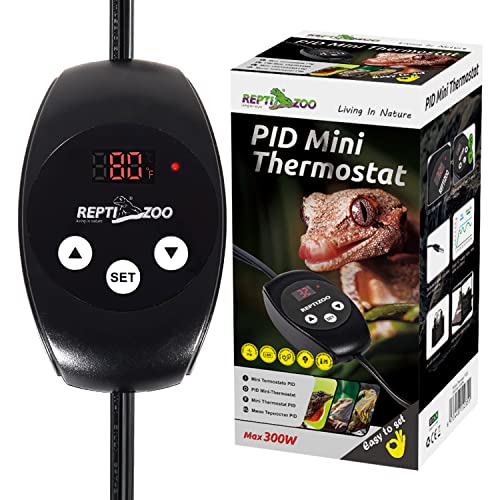
Best for: Reptile keepers who want a dimming controller intended primarily for heat bulbs, with a simple digital interface. Its stated constant-temperature range is 41°F to 140°F, which gives buyers a broad setpoint range to compare against their species’ habitat needs.
The controller uses PID heating mode and a temperature probe to monitor conditions and adjust the connected heater. The LED screen displays both ambient and set temperatures, and the controls allow switching between Fahrenheit and Celsius. The manufacturer also lists a memory function.
Why it was selected: It is specifically described as a dimming thermostat for reptile heat lamps, and the listed functions make its settings and current reading easy to check.
Limitation: The listing says not to use this thermostat with a sunlamp. Confirm that your exact bulb or heater is suitable before connecting it, and check the device’s instructions for other restrictions.
REPTITRIP Day-Night Dimming Thermostat

Best for: Keepers who need distinct daytime and nighttime temperature settings. The product listing describes dual presets and automatic day-night cycle control, which can reduce the need to change the thermostat manually as the schedule changes.
This PID temperature controller is described as compatible with most heat lamps and as suitable for heat lamps or mats. Its stated maximum load is 260W. The listing also describes gradual dimming of heat sources and provides examples of separate daytime and nighttime setpoints.
Why it was selected: Among these options, its standout feature is automated day-and-night programming. It may be a better fit than a single-setpoint controller for a setup that calls for scheduled temperature changes.
Limitation: The supplied product details do not state a full temperature-control range. Check the product instructions and confirm that the required setpoints and the connected heater are supported before use.
LUCKY HERP Dimming Thermostat
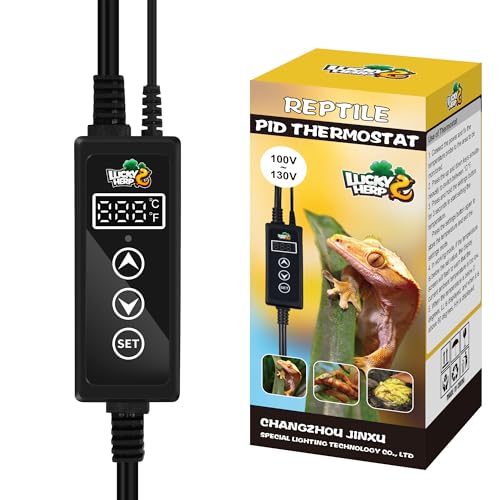
Best for: Reptile owners who want PID control, a digital display, and a memory function. Its listed temperature range is 68°F to 122°F, so compare that range with the target temperatures for your animal’s enclosure before choosing it.
The manufacturer says the controller monitors temperature through a sensor and automatically adjusts power to the connected heating device. The LED screen shows ambient and set temperatures, and the display can be switched between Fahrenheit and Celsius. Listed compatible heater types include heat lamps, heat mats, and other heaters.
Why it was selected: It combines several commonly sought features—PID dimming, a memory function, and dual-unit display—in a product described for reptile heating.
Limitation: The listed lower setpoint is 68°F. Choose another model if your required controlled temperature is below that threshold, and verify that the heater type is appropriate for dimming control.
ReptiKing PID Dimming Thermostat

Best for: Keepers using a basking heat bulb or ceramic heat emitter who want a PID thermostat with a probe that can be fixed in place. The product listing also says it is designed for heat lamps or heating pads.
The controller’s digital display shows the real-time temperature of the monitored space. Its probe includes a suction cup, which can help secure the sensor at the chosen measurement point. The product description contrasts PID control with on/off switching, explaining that the controller adjusts heating rather than simply cycling it on and off.
Why it was selected: Its stated heater applications and suction-cup probe make it a useful option to compare when probe placement is a priority.
Limitation: The supplied product information does not give a temperature-control range or maximum wattage. Check both details in the current product instructions and compare the load limit with your heater before connecting it.
CAVACHEW 300W Dimming Thermostat

Best for: Buyers who want a stated maximum load and memory function. The listing specifies a 300W maximum output load and a temperature-control range of 68°F to 122°F.
This PID controller is described for heat lamps, bulbs, and heat mats. It uses a temperature probe to monitor conditions and adjust power, while its memory function is intended to restore the previous settings after power is turned back on. The LED digital screen displays temperature, with Fahrenheit and Celsius options listed.
Why it was selected: The stated load limit, temperature range, and memory feature make it easier to compare with a heating setup that has known requirements.
Limitation: Its range begins at 68°F, and the maximum load must not be treated as a target. Verify both the heater’s wattage and the required controlled temperature against the product documentation.
Buying Guide: How to Choose a Dimmable Reptile Thermostat
Does the thermostat match your heat source?
Start by checking the exact heater type. A thermostat designed for dimming may not be appropriate for every bulb or heating device. Product descriptions may list heat lamps, heat mats, ceramic heat emitters, or other heaters, but do not assume that every listed device is supported by every model. Follow the thermostat and heater instructions, including any stated exclusions.
In particular, REPTI ZOO’s listing says not to use its thermostat with a sunlamp. If your setup includes a lamp that produces light as well as heat, confirm that the controller is intended for that specific type before plugging it in.
What temperature range do you need?
Compare the thermostat’s stated range with the temperatures required for your reptile and the specific area you are controlling. The five products differ: REPTI ZOO lists 41°F to 140°F, while LUCKY HERP and CAVACHEW list 68°F to 122°F. REPTITRIP and ReptiKing do not provide a full range in the supplied product details.
A controller’s range does not establish the correct temperature for an animal. Use reliable husbandry guidance for your species and habitat, and check temperatures at the relevant basking or warm-zone location.
Where should you place the temperature probe?
The thermostat regulates heat based on the temperature detected at its probe. Place and secure the probe where you need temperature control, rather than choosing a location solely for convenience. A probe in a different spot may read a different temperature from the basking surface or other area you are trying to manage. Follow the product instructions for positioning and attachment.
Do you need one setting or day-night programming?
A single-setpoint controller can suit a setup that uses one target temperature. If you need separate scheduled settings, REPTITRIP lists dual day-and-night presets. Check whether its programming method and available temperature settings match your intended schedule. Do not assume that a single-temperature thermostat will provide automatic night changes.
How important are wattage and display features?
Check the heater’s wattage against the thermostat’s maximum load before connecting it. CAVACHEW lists a 300W maximum, and REPTITRIP lists a 260W maximum. The REPTI ZOO fixture bundle, discussed separately from the standalone controller, lists a 100W maximum for its lamp fixture. These limits apply only as stated for those products; do not infer a rating for models whose supplied details do not specify one.
A digital screen, Fahrenheit/Celsius selection, and memory function can make settings easier to check or restore. These conveniences do not replace verifying the probe reading and confirming the thermostat is controlling the intended heater.
Should you buy a thermostat-only controller or a fixture?
A standalone thermostat connects to a compatible heating device you already have. A thermostat-and-fixture product may combine temperature control with a lamp holder, but the bulb may not be included. Check what is supplied, the fixture’s wattage limit, and the type of lamp base before buying. The REPTI ZOO fixture option in the product list is a separate product from its standalone dimming thermostat.
Frequently Asked Questions
What does a dimming thermostat do for a reptile enclosure?
A dimming thermostat adjusts power to a compatible heater to regulate temperature, rather than relying only on simple on-and-off cycling. It uses a probe reading to guide that adjustment. The specific control method and compatible heater types depend on the model.
Can I use any heat lamp with a dimming thermostat?
No. Check the thermostat’s compatibility information and restrictions for the exact lamp. Some controllers may not be intended for certain lamp types, and REPTI ZOO specifically says not to use its model with a sunlamp.
Where should I put the thermostat probe?
Position the probe in the area whose temperature you want the controller to regulate, and secure it according to the product instructions. Probe placement affects the reading, so choose a location that reflects the target zone rather than an unrelated part of the enclosure.
Is a day-night thermostat necessary?
It is useful when your setup requires different scheduled temperature settings for day and night. If one setpoint is appropriate for your controlled area, a single-setting thermostat may be sufficient. Base the schedule on suitable care guidance for your species.
How do I know whether a thermostat can handle my heater?
Compare the heater’s wattage with the thermostat’s stated maximum load, and verify that the heater type is supported. If the product information does not state a maximum load or compatible heater type, consult the manufacturer’s documentation before use.