Yes—top picks for 3D printer enclosure heaters help stabilize chamber temperatures, reduce warping, and improve print quality for temperature-sensitive materials. This guide highlights five reliable options suited for different printer setups and user needs. The list includes compact mini heaters for resin and FDM setups, smart features, and filament-drying capabilities. Whether you’re a hobbyist, a small workshop operator, or a student lab manager, you’ll find a model that matches your enclosure size and workflow.
Buyer snapshot: the top five products below are selected for clarity, safety features, and practical use in typical home or small-shop environments. The table summarizes who each product is best for and notable considerations.
| Product | Best For | Key Consideration |
|---|---|---|
| Chitu Systems Upgraded Mini Heater | Resin and compact LCD/FDM printers | Up to 70°C, simple install, compact footprint |
| ELEGOO Smart Mini Heater | Resin/MSLA printers with air filtration | Intelligent control, self-regulating PTC, filtration |
| Creality Chamber Heater For Enclosure | Enclosures and filament storage boxes | Up to 70°C, dual safety features, drying function |
| BIQU Panda Breath 3-in-1 | High-end climate control for multiple printers | Smart start/stop, built-in filter, filament dryer |
| Official Creality Filament Drying Chamber Heater (Lutyr) | Filament storage and enclosure environments | 70°C, independent temp control, drying |
Chitu Systems Upgraded 3D Printer Mini Heater

The Chitu Systems Mini Heater offers a compact, versatile solution designed to fit most LCD resin printers and some FDM setups. It provides rapid temperature rise to improve print quality in enclosed spaces and features overheat protection for safe operation. With a maximum power around 200W and a target ceiling of 70°C, this unit emphasizes ease of installation and cable management without requiring casing modifications.
Best for: resin printers using LCD-based workflows and users who want a plug-and-play enclosure upgrade. It is suitable for small enclosures where keeping a clean, tidy setup matters. It’s a practical pick for hobbyists seeking a straightforward heater with decent power and protection.
Limitations: 70°C ceiling may not be sufficient for certain high-temperature materials or very large print chambers. Ensure your printer’s enclosure can accommodate the unit’s dimensions.
ELEGOO Smart Mini Heater for Resin 3D Printer

The ELEGOO Smart Mini Heater combines intelligent temperature control with an integrated air filtration system. It is designed to keep a stable chamber environment, reducing detachment, warping, and interlayer adhesion problems that can derail resin printing. The self-regulating PTC heating element helps prevent overheating while delivering efficient warm-up and consistent heat distribution.
Best for: resin-focused workflows where clean air and stable chamber temperatures matter. The built-in filtration is a notable advantage in small, shared spaces. Choose this if you prioritize ongoing print stability and air quality.
Limitation: Some users may require additional filtration filters or firmware considerations to maximize long-term performance.
Creality Chamber Heater For Enclosure

This enclosure heater is designed specifically for 3D printer enclosures and filament storage systems. It delivers adjustable hot air up to 70°C and includes overheat protection and fan safety features. The device also supports filament drying and storage functions, making it a practical all-in-one option for maintaining chamber warmth and moisture control in storage areas.
Best for: users who want a dedicated enclosure heater with dual purposes—warming the chamber and supporting filament dryness in storage. It is suitable for ABS, PA, and PC materials that tolerate stable heat. Avoid this if your enclosure requires higher than 70°C or larger-scale heating.
BIQU Panda Breath 3-in-1 Smart Heater
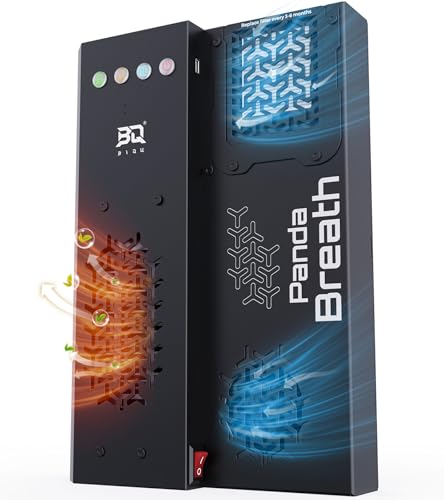
The Panda Breath combines a 300W PTC heater, air filtration, and a filament dryer into a single smart unit. It can automatically start or stop based on filament types and is controllable through a Web UI. The dual filtration system—HEPA and activated carbon—helps reduce odors and particulates in the printing environment, while the drying function supports moisture-sensitive materials.
Best for: users who want an all-in-one climate and air-quality solution with automation. It’s ideal for printers like Bambu Lab and other high-end setups that benefit from integrated filtration and drying. Limitation: firmware updates may be required for optimal automatic behavior, and replacement filters are an ongoing need.
Official Creality Filament Drying Chamber Heater (Lutyr)

Creality’s Filament Drying Chamber Heater is designed to maintain dry, stable filament conditions within enclosure and storage environments. It supports rapid warm-up to 70°C with a 400W PTC heater and dual axial fans. An independent temperature controller and 1-48 hour timer help maintain consistent settings, while power-off memory preserves last-used temperatures.
Best for: environments where moisture-sensitive filaments are common and where you need a dedicated drying function alongside chamber heating. Choose this if you want a straightforward, reliable dry-and-warm setup for filament storage boxes or enclosed printers.
Buying Guide: Key Considerations For 3D Printer Enclosure Heaters
What size is your enclosure and printer? Measure the interior space to ensure a heater fits without crowding cables or blocking vents. Larger enclosures may benefit from higher-powered units, while compact printers do well with mini heaters.
What materials are you printing with? Temperature-sensitive materials like ABS, ASA, PC, and PA require stable heat around 45–70°C. If your materials tolerate higher temps, confirm the heater can reach the needed range safely.
Do you need filtration or drying? Some models include air filtration or filament drying, which helps reduce odors and moisture-related print issues. If you work with hygroscopic filaments, consider a unit with a drying function.
Is automation important? Smart systems with web UI controls or automatic start/stop can simplify operation, especially for multi-hour prints. Verify compatibility with your printer’s firmware and connectivity options.
What about safety features? Overheat protection, fan stall protection, and memory recall help prevent damage to printers and enclosures. Look for multiple safety modes and easy disconnection in emergencies.
Frequently Asked Questions
- Do enclosure heaters require modifications to my 3D printer? Generally, no; most units are designed for plug-and-play installation, though some setups may benefit from minor cable management adjustments.
- Will heating an enclosure affect print accuracy? Properly controlled exposure to stable enclosure temperatures can reduce warping and improve layer adhesion, especially for ABS and PC materials.
- Can I use a heater with a filament storage box? Yes, several options also support drying and warming in filament boxes to maintain dry filament before and during prints.
- Are these heaters safe for resin printers? Mini heaters designed for LCD resin printers typically include overheating protection; ensure you follow manufacturer installation guidelines.
- How do I choose between a mini heater and a multi-function Panda Breath-type system? If you want an all-in-one solution with filtration and automation, a smart 3-in-1 system may be better; otherwise, a compact heater can suffice for smaller enclosures.
- What maintenance is required? Replace filters as recommended, monitor warm-up times, and inspect cables for wear. Many units offer memory settings to simplify recurring prints.