Answering the top buyer question: which smart switch for a fireplace offers reliable control, safety, and easy setup? This guide highlights five Amazon options designed for millivolt gas valves and electronic ignition systems. These devices suit homeowners seeking hands‑free operation, programmable schedules, and voice control with Alexa, Google, or Siri. The top picks vary from simple on/off remotes to full smart thermostats with timers. A quick comparison helps you choose based on compatibility, installation needs, and desired automation level.
| Product | Best For | Key Benefit | Limitations |
|---|---|---|---|
| Durablow SH3001 | Smart-home newcomers | WiFi control without hub, voice support | 2.4GHz WiFi only |
| TV xStream B455 | Voice‑powered setups | Voice control directly via smart voice commands | Requires compatible smart plug/outlet |
| Amazon Basics Smart Switch | Alexa users seeking easy install | Simple setup and routines | Alexa only, not multi‑assistant cross‑control |
| Durablow SH3001‑RH | Remote + voice control | Includes extra handheld transmitter | 2.4GHz only |
| Durablow SH3002 | Thermostat‑enabled control | Programmable thermostat with timer | Not a direct power supply or ignitor |
Durablow SH3001 On/Off WiFi Gas Fireplace Remote Control

The Durablow SH3001 provides remote on/off control for millivolt gas valves and electronic spark ignition. It connects to 2.4GHz WiFi and supports Smart-Life app access, enabling control from anywhere and the creation of on/off timers. It integrates with Amazon Alexa, Google Home, Samsung SmartThings, IFTTT, and Siri for voice control. Best for homeowners who want straightforward, hub‑free WiFi control and scene-based automation.
Best for: New smart‑home users who want a simple, reliable setup without extra hubs. Choose this if you want voice control and scheduling via a familiar app ecosystem. Caution: does not operate on 5GHz networks; ensure compatible WiFi and installation clearances.
TV xStream Voice Fireplace Switch (Model B455)
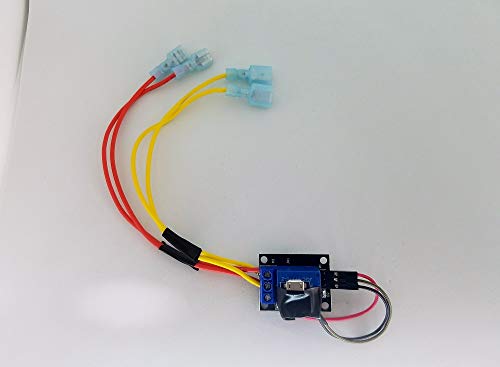
The TV xStream switch adds voice control for gas fireplaces using standard smart outlets combined with a dedicated control switch. It supports voice commands like “Hey Google, Turn On The Fireplace” and works with common smart outlets (not included). Best for users who want hands‑free operation through voice and are willing to pair with a compatible outlet or switch to enable smart features. Limitation: requires a separate smart outlet and may require more setup steps to ensure compatibility with a given fireplace valve.
Amazon Basics Smart Light Switch (Single Pole)

Amazon Basics offers a single‑pole smart switch for Alexa users, enabling voice control, scheduling, and routines. This option is best for buyers prioritizing simple installation and familiar Alexa integration. It is not a multi‑assistant solution, so consider this if you want broad assistant compatibility beyond Alexa. Caution: features are optimized for lighting control and may require additional hardware for fireplace valve integration.
Durablow SH3001‑RH Gas Fireplace Remote Control

This variant adds an extra On/Off transmitter and programmable schedules for millivolt gas valves with a remote handset. Best for households that want a backup remote alongside app control and the ability to automate routines via the Smart-Life ecosystem. Limitation: still relies on 2.4GHz WiFi for full features and requires pairing with the fireplace system as described in the manual.
Durablow SH3002 Gas Fireplace WiFi Smart Control

Durablow SH3002 emphasizes programmable thermostats and schedules, with 2.4GHz WiFi and compatibility with Alexa, Google, SmartThings, and Siri. It features a detachable thermostat sensor for room temperature monitoring and automation. Best for users who want temperature‑based automation to optimize comfort and energy savings. Caution: not a direct power supply or ignitor unit; it passes voltage through the fireplace system for safety reasons.
TV xStream Fireplace Remote Switch (2‑Wire Quick Connect)
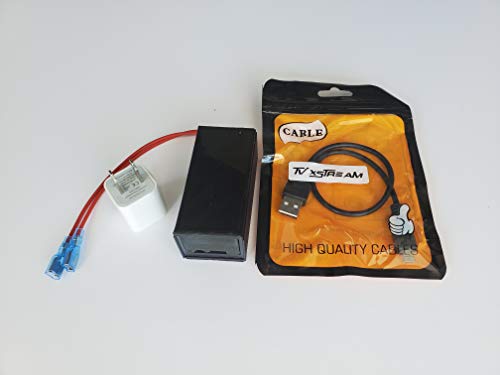
The TV xStream remote switch provides hands‑free control through voice assistants and requires eWeLink app pairing. It targets fireplaces with millivolt valves and electronic ignition. Best for converting a non‑smart fireplace into a voice‑enabled unit with a dedicated wall switch. Limitation: compatibility depends on the specific fireplace wiring and ignition setup; check connection options in product images before purchase.
Buying Guide
What to consider when choosing a smart fireplace switch:
- Compatibility with valve type: Ensure the device is designed for millivolt valves and electronic ignition systems.
- WiFi frequency: Many devices require 2.4GHz WiFi; confirm your home network supports this band.
- Voice ecosystem: If you use Alexa, Google, or Siri, verify multi‑assistant compatibility.
- Hub requirements: Most options are hub‑free, but some setups benefit from a hub for broader automation.
- Safety and temperature: Check that controllers have proper heat protection and installation guidelines to avoid overheating.
- Thermostat vs. simple on/off: Decide whether you want temperature scheduling and comfort automation or straightforward remote control.
- Inclusion of remote or accessories: Some models include extra remotes or thermostats; factor these into your setup.
FAQ
- Can these switches control gas fireplaces with any type of ignition?
Answer: They are designed for millivolt valves and electronic ignition systems; verify compatibility with your specific model. - Do I need a hub to use these devices?
Answer: Most are hub‑free and connect directly to WiFi, but some configurations may benefit from a compatible hub. - Will they work with multiple voice assistants at once?
Answer: Many options support Alexa, Google Home, and Siri, but confirm each model’s listed integrations. - Is a thermostat feature available for temperature control?
Answer: Some models include programmable thermostats or temperature sensors for automation. - Are these products safe for fireplace use?
Answer: They are designed with heat considerations in mind; follow installation manuals and keep units within recommended temperatures. - What if my home uses 5GHz WiFi?
Answer: Most devices require 2.4GHz; a dual‑band router can help ensure compatibility by selecting 2.4GHz for the device setup.